
Intelligently converts plain text math expressions into superscript & subscript notation. Supports caret, underscore, and implicit notation. Three output formats.
The smart parser handles multiple notations for both superscripts and subscripts simultaneously.
Every feature is crafted for real academic and professional use cases.
Handles caret (^), underscore (_), and implicit notation. Detects superscript vs subscript context automatically.
Paste entire blocks of text with multiple formulas at once.
Unicode characters, HTML sup/sub tags, or raw LaTeX — ready for any platform or document.
Normalises spacing, converts * to ×, removes extra whitespace around operators. Toggle on or off.
Converts in real time as you type — no need to press a button.
Colour-code superscripts (purple), subscripts (cyan), functions (teal), and operators to verify output visually.
Paste multiple expressions — each line is processed independently for batch workflows.
Fully responsive — works perfectly on phones, tablets, and desktops.
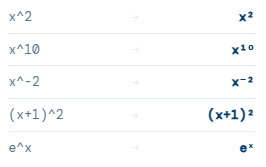
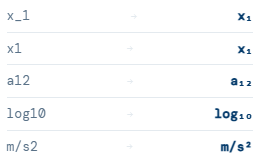
Type or paste any math expression using standard keyboard notation: x^2, x_1, or x1.
Select Math, Chemistry, or Auto mode, then pick your output format: Unicode, HTML, or LaTeX.
Copy the formatted result and paste it into Word, Google Docs, a website, or any LaTeX editor.
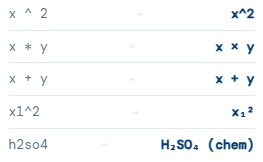
In Math mode, a number immediately after a variable letter (like x1) is treated as a subscript index — x₁. In Chemistry mode, numbers after letter groups are also subscripted but element symbols are capitalised correctly (h2o → H₂O). Auto mode tries to detect which is appropriate based on whether your input looks like chemical element symbols or algebraic variables.
The tool supports three input conventions: caret notation (x^2 for superscript), underscore notation (x_1 for subscript), and implicit notation (x2 where a number after a variable becomes subscript in math mode). All three can be mixed in the same expression — e.g., x1^2 gives x₁².
HTML mode produces x2 for superscripts and x1 for subscripts. This renders correctly in any web browser and is ideal for blog posts, websites, CMS platforms, and HTML emails. Copy the HTML output and paste it directly into your HTML editor or content block.
LaTeX mode produces x^{2} for superscripts and x_{1} for subscripts — the standard LaTeX math notation. This output is ready to paste directly into Overleaf, LaTeX documents, or any platform that supports LaTeX math rendering such as Jupyter notebooks, Notion, or Obsidian.
Auto-clean normalises your input before processing. It removes extra spaces around operators (so “x ^ 2” becomes “x^2”), collapses multiple spaces into one, converts the asterisk * into the multiplication symbol ×, and ensures the output is consistently formatted. You can toggle it off if you need to preserve the original spacing.
A math expression formatter converts plain-text mathematical notation — the kind you’d type on a standard keyboard — into properly typeset scientific notation using Unicode subscripts, superscripts, or markup like HTML and LaTeX. When you write x^2 on a keyboard, you mean x squared, but that’s not how it appears visually. This tool bridges that gap instantly.
The most common use cases are algebra and calculus (x², y₁, (a+b)²), physics (m/s², v₀, E=mc²), chemistry (H₂O, Na₂SO₄), and statistics (x̄, σ², μ₁). All of these require proper subscript and superscript notation to communicate correctly.
The three output modes serve different purposes: Unicode works in virtually any plain-text context — social media, messaging apps, word processors; HTML is ideal for websites and web content using tags; and LaTeX is the gold standard for academic documents, research papers, and any platform that supports TeX math rendering.